How to Open Cases in Skyships and Get the Weapon Blueprint Inside
Find your cases in the inventory, open them on the CASES screen, then build the revealed weapon blueprint at a port market and equip it on your ship.
Opening a case in Skyships is simple: find your cases through your inventory, open one from the dedicated CASES screen, watch the opening play out, and it reveals a weapon blueprint card. From there, you build the blueprint at a port market and equip the finished weapon on your ship.
Quick answer
Open cases from your inventory via the CASES screen; the opening reveals a weapon blueprint card, which you then build at the port market's BLUEPRINTS tab and equip through your ship's weapon-slot 'CHOOSE A GUN' list.
Step 1: Find your cases in the inventory
Your cases live in your inventory. In one recorded gameplay session, the player searched for where to open their crate inventory, located their cases there, and opened them one after another. Once you have found a case you own, opening it takes you into the case-opening interface.
Step 2: Open the case on the CASES screen
Skyships has a dedicated CASES screen listing all six case tiers:
- TRAINING CASE
- COMMON CASE
- UNCOMMON CASE
- RARE CASE
- EPIC CASE
- LEGENDARY CASE
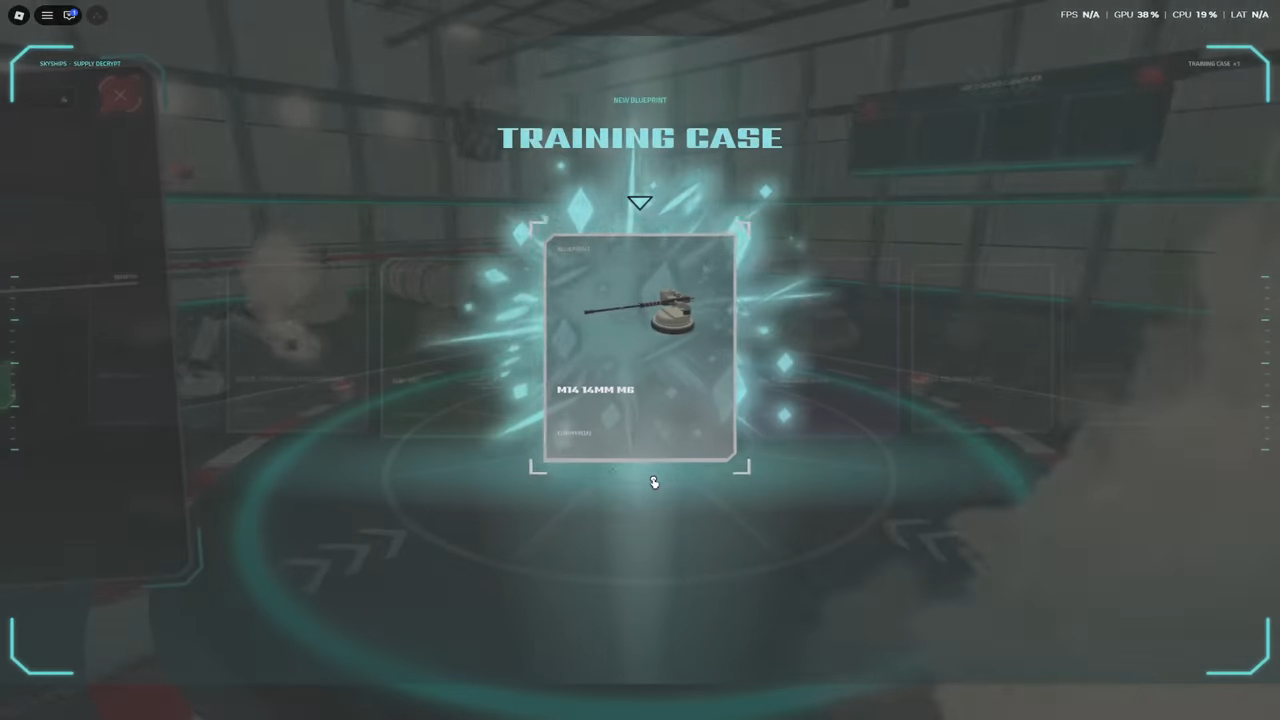
When you open a case, an opening plays out first. During an opening, the interface can show your chance percentage — for example, a "20% chance" display was visible in recorded gameplay. When the opening finishes, the result is revealed as a weapon blueprint card. A new blueprint is labeled "NEW BLUEPRINT"; in one observed opening, a TRAINING CASE revealed the M14 14MM MG.
Step 3: Build the blueprint at a port market
A revealed blueprint is not a weapon yet — you have to build it. This requires you to be at a port. Open the port market's BLUEPRINTS tab and use the "BUILD THE NEW GUN" option to construct the weapon you just won.
Step 4: Equip the weapon on your ship
With the gun built, go to your ship's weapon slot and open the "CHOOSE A GUN" list to equip it. Recorded gameplay shows entries like "M6 9 HYDRA ROCKETS, DPS 33" in this list, so you can compare the damage-per-second values of the guns available to you before choosing.
Skipping the opening animation
If you would rather not watch the case opening each time, Skyships sells an optional "Case Skip" game pass for R$29, described as "Skip every case opening straight to the result. Forever." The game itself is free, so this pass is entirely optional — it simply takes you straight to the blueprint reveal without the wait.
That's the full loop: collect cases, open them on the CASES screen, build the revealed blueprint at a port market, and equip the finished gun on your ship. If you're newer to the game, the Skyships beginner guide covers the basics, and the Skyships cases guide has more on the case system itself.