Skyships Beyond the Clouds: Confirmed Places, Landmarks and How the Map Guides You
What actually lies past the clouds in Skyships: named regions, ports and landmarks, how the tactical map shows them, waypoints, and the tier warning to watch.
Quick answer
Sailing out past the clouds, the confirmed things you find are named regions with danger tiers, ports like Fort Meridian and Fort Cebar, labeled landmarks such as Widow's Cut and Hostile Skies, resource deposits, wreck sites, world events like meteor strikes, and enemies you may not be ready for. The game shows you where to go through the tactical map on key M, which labels everything by name and distance and lets you set a waypoint with right-click to navigate toward it.
- Named regions with danger tiers
- Ports such as Fort Meridian and Fort Cebar
- Labeled landmarks such as Widow's Cut and Hostile Skies
- Resource deposits and wreck sites
- World events like meteor strikes
- Enemies you may not be ready for
Beyond the clouds is the game's stated exploratory goal. As the official description puts it: "Take your ship, chase the horizon, and find out what hides beyond the clouds. Some captains come back with legends. Most never come back." Outward voyages carry real risk, and the game expects you to weigh it before you commit your ship and crew to the horizon.
The tactical map is how the game shows you the world
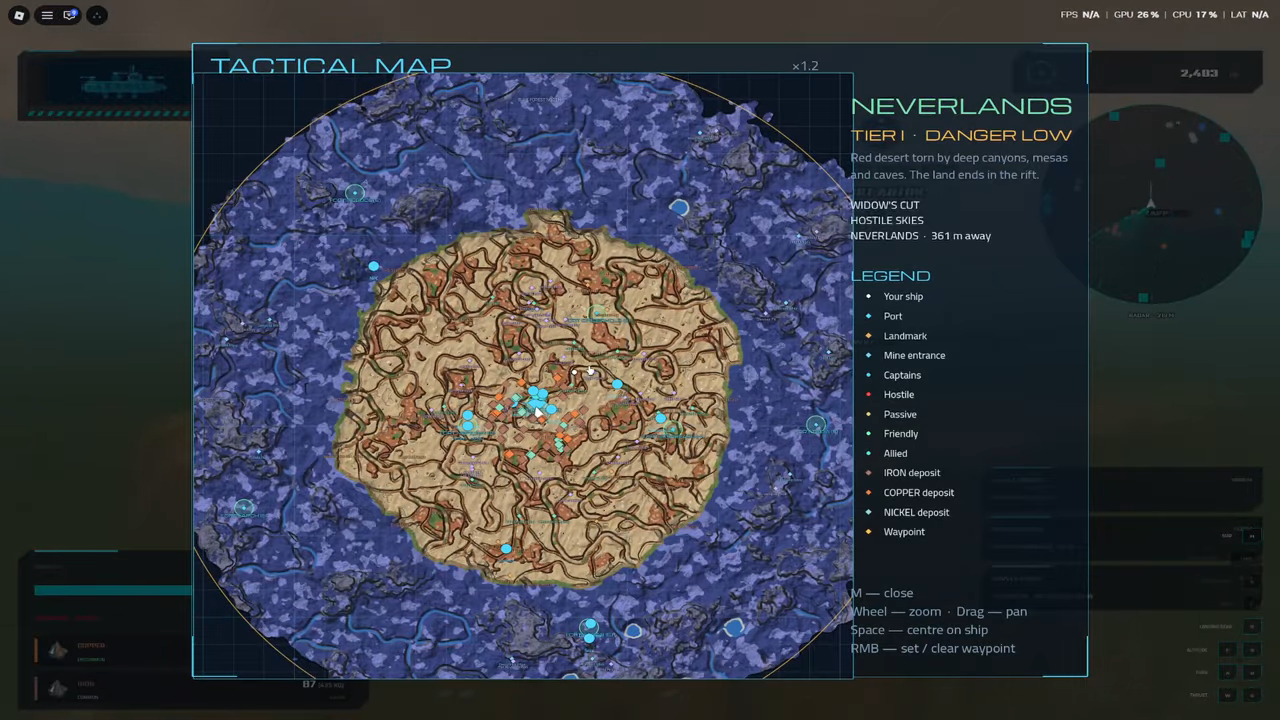
Press M to open the TACTICAL MAP. It displays your current region with its danger tier — for example "NEVERLANDS TIER 1 - DANGER LOW" with the region description "Red desert torn by deep canyons, mesas and caves. The land ends in the rift." Region names and descriptions vary per area, and the regions observed so far are presented this way, so the map is the game's central answer to "where am I and what is out here?"
The map also labels named locations and landmarks directly. In the NEVERLANDS, for instance, you can see markers like "WIDOW'S CUT" and "HOSTILE SKIES," shown with their distance — during one observed run, a location was listed as 361 m away. The map's LEGEND explains the marker types: Port, Landmark, Mine entrance, Captains, Hostile, Passive, Friendly, Allied, IRON/COPPER/NICKEL deposits, and Waypoint markers. Reading the legend tells you at a glance whether a distant label is a safe harbor, a hostile area, or a mining opportunity.
Map controls
| Action | Effect |
|---|---|
| Press M | Open or close the tactical map |
| Mouse wheel | Zoom |
| Drag | Pan across the map |
| Space | Centre the map on your ship |
| Right-click | Set or clear a waypoint |
The waypoint tool is the practical bridge between seeing a destination and reaching it. When you spot a distant landmark or a deposit marker, right-click it to set a waypoint, close the map, and sail toward the marker until you arrive.
What you actually find out there
Sailing outward from the starting area reaches additional named ports and regions. Two confirmed during a recorded voyage are Fort Meridian (2), which has a CONTRACTS panel including "BOUNTY HUNT T2", and Fort Cebar, located in a snowy purple-forest area. Other ports may exist beyond these.
Farther sectors also hold new resources and discoveries. One run that pushed into a distant "fire forest" sector found silver and then tungsten deposits, and the player marked the good mining spots on the map for later. The same run showed the risks of going far: a downed ship whose hold might still be full, and a "warlord" enemy the player could not beat yet — they chose to retreat rather than overextend. What you find, and what you can safely take, depends on the area and your ship's strength.
Not every destination is a fixed place on the map. The game also drives travel with events: a Meteor strike announces itself with "Something valuable just hit the ground. Signal acknowledged. Plotting a course," and you can set course toward it to mine what it dropped — nickel and iron in that instance.
Watch the tier warning
As you range outward, the game tells you when you have gone too far for your current ship. Entering a zone above your ship's tier triggers the warning "Warning. This zone is beyond our tier" while hull stress rises and the crew recommends reducing speed. Treat this as the game's signal that you have sailed into a more dangerous area than your ship is rated for — a good moment to decide whether to press on or turn back, as the player facing the warlord did.
In short
The confirmed structure of the world past the clouds is: named regions with danger tiers, ports and labeled landmarks readable on the tactical map, resource deposits and wrecks in distant sectors, and event-driven objectives like meteor strikes. The map on M — with its legend, distances and right-click waypoints — is how the game shows you where everything is, and the beyond-our-tier warning is how it tells you when you have sailed further than your ship can safely handle.
For a fuller grounding before a long voyage, see the Skyships beginner guide, the voyages guide, and the ship controls reference.