
Skyships Player Market: How to Sell Cargo and Buy Resources
Dock at a port, open the hangar's MARKET tab and sell your mined ore for credits. Full rundown of the port market screen, prices and restocks.
Quick answer
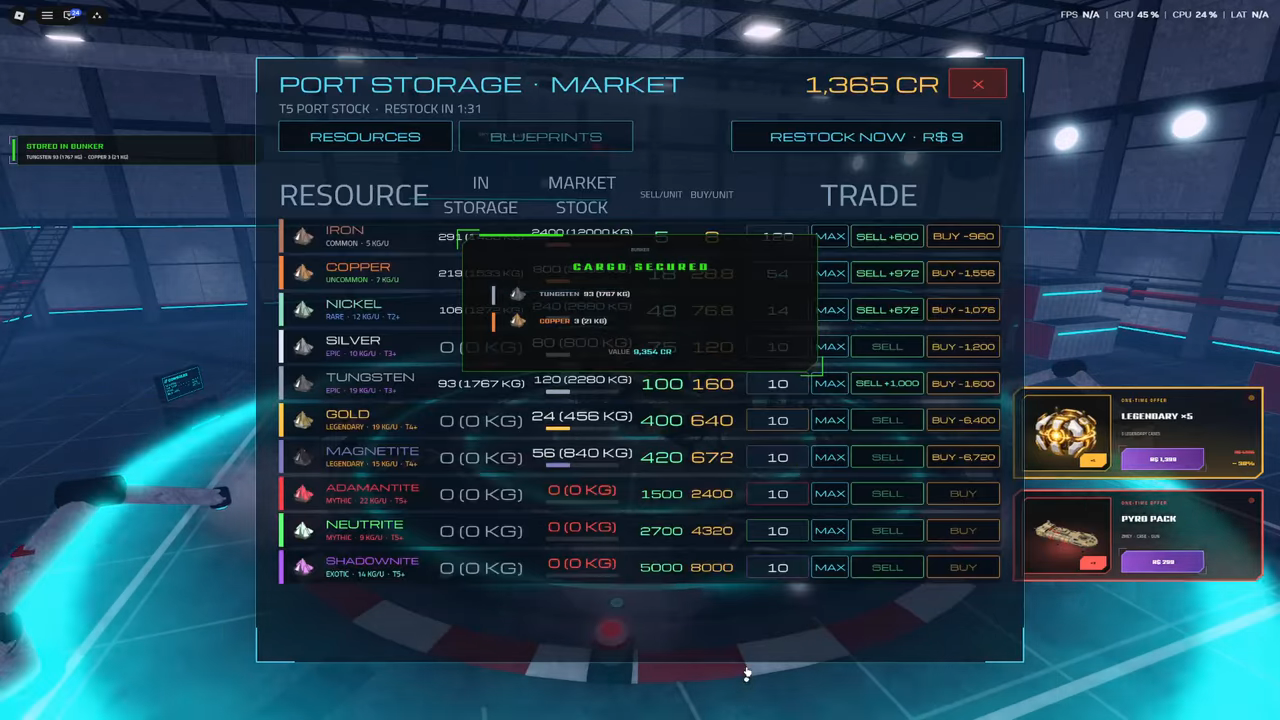
Dock at a port (FORT ANTON is one observed example), open the hangar and select the MARKET tab, then use the MAX and SELL buttons in the resource table. After the sale, the CARGO SECURED panel lists what you delivered and its CR value.
- The same screen lets you buy resources you need for a comparable (higher) price.
- Everything the market offers lives in one place: the port hangar.
Opening the market
The market is not a separate menu you find somewhere in the world — it is part of the hangar at a docked port. Once your ship is docked (FORT ANTON is one example of a port with this layout), the hangar screen shows a row of bottom tabs:
- PART
- INVENTORY
- QUESTS
- UPGRADES
- MARKET
- SHIPYARD
Next to the tabs is a shop panel, and your current credit balance sits in the top-right corner of the screen. Click MARKET and the hangar switches to the PORT STORAGE - MARKET screen, where mined ore is traded for CR.
Reading the market screen
The PORT STORAGE - MARKET screen lays everything out in one table:
- Your credit balance at the top, so you always know what you can spend.
- A T5 PORT STOCK section with a restock timer (for example, "RESTOCK IN 1:31"), showing when the port's tradeable stock refreshes.
- A resource table with the columns RESOURCE, IN STORAGE, MARKET STOCK, SELL/UNIT and BUY/UNIT.
"IN STORAGE" is what you're carrying and can sell; "MARKET STOCK" is what the port currently has available to buy. Each row has trade buttons, and trades are capped at MAX 10 units per transaction, so large hauls take a few clicks rather than one.
Selling your cargo
The sell workflow is short:
- Dock at a port (e.g., FORT ANTON) and open the hangar's MARKET tab.
- Find your resources in the table under "IN STORAGE".
- Press MAX to select your stock of that resource, then press SELL.
After the sale, a CARGO SECURED panel lists exactly what you delivered and what it earned. In one observed sale, a delivery of 93 tungsten (1,767 KG) plus 3 copper (21 KG) showed a value of 9,354 CR — roughly 9,300 CR for about 98 tungsten alone.
What your ore is worth
Sell and buy prices scale sharply with rarity, and buying always costs noticeably more than selling pays. Prices observed at one port:
| Resource | Rarity | Weight | Tier | Sell/unit | Buy/unit |
|---|---|---|---|---|---|
| Iron | Common | 5 KG/U | — | 5 | 8 |
| Copper | Uncommon | 5 KG/U | — | 8 | ~13 |
| Nickel | Rare | 12 KG/U | T2+ | 48 | ~76 |
| Silver | Epic | 10 KG/U | T3+ | ~120 | ~150 |
| Tungsten | Epic | 10 KG/U | T3+ | 100 | 160 |
| Gold | Legendary | 10 KG/U | T4+ | 400 | 640 |
| Magnetite | Legendary | 15 KG/U | T4+ | 420 | 672 |
| Adamantite | Mythic | 25 KG/U | T5+ | 1,500 | 2,400 |
| Neutrite | Mythic | 8 KG/U | T5+ | 2,700 | 4,320 |
| Shadowmite | Exotic | 14 KG/U | T5+ | 5,000 | 8,000 |
Values marked with ~ were approximate at the time of observation. Note the tier gates: higher-rarity resources carry tier requirements shown on their rows (T2+, T3+, T4+, T5+), so what you can mine and trade grows as your access does. A single unit of Shadowmite sells for as much as a thousand units of iron, which is why high-tier mining hauls are the ones that fund big purchases.
Port stock and restocking
The market only sells what the port currently has in its stock — that's what the "MARKET STOCK" column and the T5 PORT STOCK restock timer track. When the timer runs out, the port's stock refreshes. If you don't want to wait, there is a paid shortcut: a "RESTOCK NOW - R$9" option restocks the port's market immediately.
The buy side matters if you need a specific resource you can't easily mine — for crafting, upgrades or other goals — but keep in mind that at the observed port, buy prices ran well above sell prices on every resource, so selling and buying back the same cargo would lose credits.
Why the market matters
The market is the core of the credit economy. Selling mined resources at the port is how players earn credits for upgrades and ships, and the loop is simple: mine, dock, sell everything, then spend. One player running this cycle described farming as "the main backbone of the economy," repeatedly docking to sell cargo to fund purchases like 5,000-credit upgrades and new ships. If you're just getting started with mining and docking, the Skyships beginner guide and voyages guide cover how to get cargo in the first place.
Other things the market screen does
The port market isn't only for ore. Its BLUEPRINTS tab is where weapon blueprints obtained from cases get built ("BUILD THE NEW GUN") — you need to already own a blueprint from opening a case, and once built, the weapon is equipped in a ship's weapon slot. For more on cases and blueprints, see the Skyships cases guide and how to open cases.
The hangar's other tabs connect to the rest of the game: UPGRADES and SHIPYARD are where market credits usually go, and the ships guide and ship controls cover what you're buying for. If you're ready to trade ships themselves rather than cargo, see how to sell ships, and for the costs of trading, check market fees and the market listing limit.